
22MP Film & Slide Scanner with 5" LCD, Converts 35mm 126 110
4.3Editor score
Affordable price point
Built in memory support
One touch scanning
Finding the right film scanner to digital converter helps you protect old memories from fading. A good device scans slides and negatives quickly while delivering clear images you can share easily.
We evaluated ten popular models based on resolution, ease of use, and compatibility with different film types. This list covers standalone units that work without a computer for maximum convenience.
Each pick shows key strengths and ideal users so you can choose confidently. Keep in mind that product details and availability may change over time as manufacturers update their lines.
4.3Editor score

4.3Editor score

4.3Editor score
As an Amazon Associate we earn from qualifying purchases.
The following table provides a side by side comparison of all ten models to highlight key specifications and features for quick decision making.


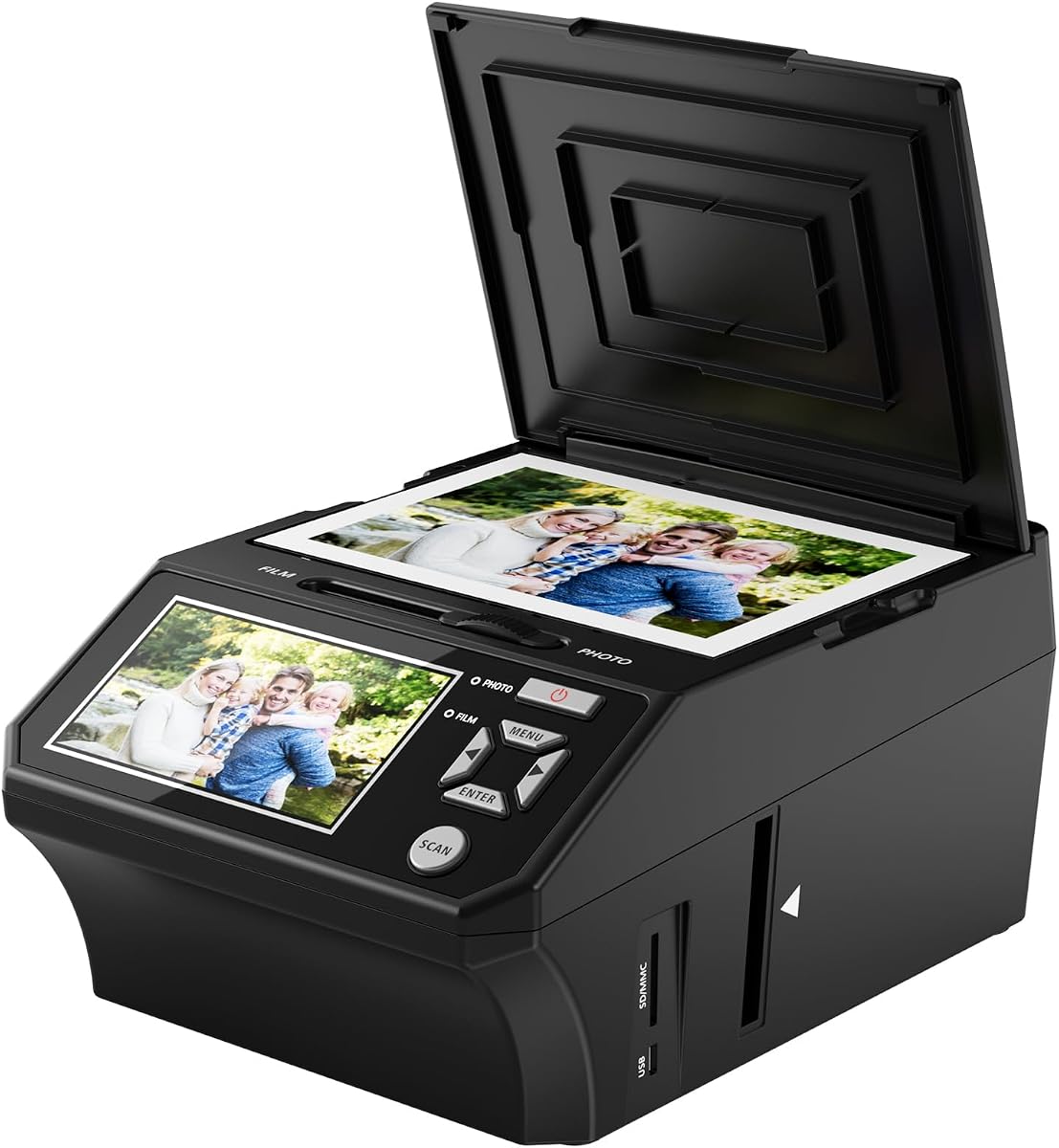


This model stands out as a top choice for families looking to digitize old slides and negatives. It offers a high resolution output that captures fine details from your vintage photos while keeping the process simple for all ages.
We may earn a commission when you buy through this link, at no additional cost to you.
The device features a large LCD screen that lets you preview and edit images directly without needing extra software. You can adjust brightness and color quickly with single touch buttons, which speeds up the workflow significantly.
While it does not include an SD card, it supports cards up to 32GB for storing your scans. The lack of built-in memory might require you to purchase a card separately but this keeps the initial cost manageable.
If you want a reliable standalone converter that works with various film formats like 135 and 110, this is an excellent pick. It balances performance and ease of use to protect your memories effectively.
The 5 inch screen allows you to see scanned images clearly and make adjustments instantly without connecting to a computer.
No drivers or complex setups are needed as the device handles scanning and saving directly to SD card for instant access.
We may earn a commission when you buy through this link, at no additional cost to you.
This scanner is ideal if you have a mix of formats including Super 8 film which is less common. It converts negatives and slides into high resolution JPEG files that preserve the quality of your original prints.
We may earn a commission when you buy through this link, at no additional cost to you.
The large display makes it easy to check your scans before saving them to an SD card. You can also connect to a TV using an HDMI cable to share memories with family on a bigger screen.
While the setup is straightforward and does not require a computer, you will need to buy a memory card separately. This is a minor cost but worth noting before you start scanning your collection.
For users with diverse film types, this model provides the flexibility needed to digitize everything from 35mm to Super 8 with ease. It is a solid choice for those who value versatility.
Unlike many basic models this scanner supports Super 8 film so you can preserve moving picture reels in addition to still images.
An HDMI port lets you connect to a TV for viewing your scanned images on a large display without needing a projector.
We may earn a commission when you buy through this link, at no additional cost to you.
This HP scanner offers a premium experience with its touchscreen control and modern USB-C connectivity. It digitizes slides and negatives without needing a computer making it great for a streamlined workflow.
We may earn a commission when you buy through this link, at no additional cost to you.
The high resolution sensor ensures that details are preserved in your digital files. You can preview and edit images directly on the device using the touch screen which feels responsive and intuitive.
While it supports common film types like 135 and 126 it may not be ideal for every niche format. The price is higher but the efficiency and build quality justify the cost for serious collectors.
If you want a sophisticated scanner that feels modern and handles batches quickly this is a strong option. It combines ease of use with professional level results for your archive.
The USB-C port allows for fast and reliable connections to modern computers for transferring your scanned files when needed.
Adjust settings like brightness and color with a simple touch on the screen instead of navigating complex button menus.
We may earn a commission when you buy through this link, at no additional cost to you.
This KODAK model is unique for its support of older 8mm and Super 8 formats alongside standard slides. It converts your old film into JPEG files so you can view them on modern devices.
We may earn a commission when you buy through this link, at no additional cost to you.
The built-in display tilts for comfortable viewing and lets you adjust color and resolution on the fly. It also comes with an HDMI cable so you can share photos on a TV easily.
The screen is smaller than other options but still bright enough for previewing. You will need to purchase an SD card separately which is a common omission in this category.
For those with vintage 8mm reels this is one of the few convenient solutions available. It simplifies the process of turning physical film into digital memories with minimal setup.
Handles 8mm and Super 8 film which are rare to find converters for today allowing you to save older family videos.
The included HDMI cable saves you from buying extras and allows quick connection to a TV for viewing scanned images.
We may earn a commission when you buy through this link, at no additional cost to you.
This device is designed specifically for converting 8mm and Super 8 motion picture film into digital MP4 videos. It allows you to view old family movies without needing a bulky projector.
We may earn a commission when you buy through this link, at no additional cost to you.
The 5 inch screen lets you preview frames and adjust settings like sharpness and exposure during the process. You can save the files directly to an SD card for easy transfer to other devices.
It does not capture audio so you will only get silent videos from your film reels. Despite this limitation it is a great way to preserve the visual history of old home movies.
If you have boxes of old film reels this scanner provides a dedicated solution to digitize them. It simplifies the workflow significantly compared to manual frame by frame capture.
Built to handle moving film reels and outputs video files instead of still images for a true movie experience.
Watch your converted films directly on the device screen before saving them for a quick quality check.
We may earn a commission when you buy through this link, at no additional cost to you.
This scanner offers great value because it includes an SD card and has a strong warranty. It digitizes slides negatives and even printed photos making it versatile for mixed collections.
We may earn a commission when you buy through this link, at no additional cost to you.
The large screen helps you see details clearly while you scan. It works without a computer so you can take your time editing images directly on the device with simple buttons.
While it does not include an HDMI cable it focuses on providing a complete package out of the box. The warranty gives you extra peace of mind for long term use.
For families wanting a straightforward tool that comes with necessary accessories this is a smart pick. It simplifies the digitizing process with everything you need included.
Includes an SD card and all holders so you can start scanning right away without buying extra accessories.
Supports scanning printed photos like 4R and 5R sizes which adds versatility beyond just film negatives.
We may earn a commission when you buy through this link, at no additional cost to you.
This model features a large 7 inch screen that doubles as a digital frame for your scanned photos. The quick feeding tray makes it easy to process many images in a row.
We may earn a commission when you buy through this link, at no additional cost to you.
You can edit images with one touch options to resize or adjust colors quickly. It supports common film types like 135 and 126 and saves directly to SD card.
The large screen is a standout feature that makes reviewing scans much easier than on smaller devices. It is especially useful for those who want to display photos without printing.
For users who prioritize viewing comfort and batch processing this scanner delivers well. It combines functionality with a user interface that is easy to navigate.
The 7 inch display provides ample space to check photos and use the device as a frame when not scanning.
The tray allows continuous loading so you can slide in multiple films and scan them in sequence without stopping.
We may earn a commission when you buy through this link, at no additional cost to you.
This is one of the most affordable options that still offers high resolution and useful features. It has built-in memory so you can start scanning without buying a card first.
We may earn a commission when you buy through this link, at no additional cost to you.
The 5 inch screen lets you preview photos and the included HDMI cable allows TV viewing. It supports many common formats and uses simple buttons for easy operation.
The editing options are basic but sufficient for most users who just need to preserve their photos. The price point makes it accessible for anyone wanting to digitize old memories.
If you are looking for a cost effective scanner that works well for basic needs this is a great choice. It balances features and price for a low barrier to entry.
The device has internal memory so you can test it out or save a few images before getting an SD card.
Keeps costs low while still providing 22MP resolution and HDMI output for good quality results.
We may earn a commission when you buy through this link, at no additional cost to you.
This model comes with an impressive 36 month warranty which shows the manufacturer stands behind its quality. It has a modern Type-C port for fast data transfer to your computer.
We may earn a commission when you buy through this link, at no additional cost to you.
The 5 inch screen and gallery mode make it easy to view and share your digitized photos. It supports many film formats and converts them quickly to JPEG files with simple buttons.
You will need to buy an SD card separately and the device needs to be plugged in during use. These are minor trade offs for the long term protection offered by the warranty.
For those who want security and modern connectivity this is a strong option. The warranty gives you confidence that the device will last for your projects.
The 36 month coverage is longer than many competitors giving you peace of mind for years of use.
Type-C port allows fast transfer and fits well with newer computers for easy file backup.
We may earn a commission when you buy through this link, at no additional cost to you.
This scanner features a large 7 inch touch screen that makes reviewing and editing photos very intuitive. The batch tray helps you process many slides quickly without constant reloading.
We may earn a commission when you buy through this link, at no additional cost to you.
You can crop and adjust scans directly on the touch display without needing a computer. It supports common formats like 135 and 126 and saves to SD card for storage.
While the resolution is slightly lower than some models it still captures details well enough for sharing. The touch interface makes it feel modern and easy to use for beginners.
If you prefer a touch screen and want a large view for your scans this is a good choice. It combines convenience with a friendly interface for all users.
Navigate menus and edit images with a touch screen which simplifies the process for non tech users.
The batch tray allows you to load multiple slides and scan them in sequence for efficiency.
We may earn a commission when you buy through this link, at no additional cost to you.
Selecting the right converter depends on your film types and how much you want to edit.
Check which film types the device supports such as 35mm 126 110 or Super 8. Some models are specific to slides while others handle negatives and motion pictures as well.
Ensure the scanner matches your collection so you do not need multiple devices for different formats.
Higher resolution like 22MP or 24MP captures more detail from your old photos. This helps when printing or zooming in on scanned images later.
Look for at least 22MP interpolation for clear results that preserve the original look of your photos.
A larger screen like 5 inch or 7 inch makes it easier to see details and adjust settings. Smaller displays can be hard to read for some users.
Choose a screen size that feels comfortable for previewing your scans during the workflow.
Many modern converters work without a computer allowing you to scan directly to SD card. This simplifies the process especially for non tech users.
Confirm the device does not require drivers or software installation for basic scanning tasks.
Look for simple editing options like brightness adjustment or color correction on the device. This helps improve your images before saving them.
One touch editing buttons are best for quick fixes without complicated menus.
Ports like USB-C HDMI or Type-C allow you to transfer files or view images on a TV. Modern connections make sharing photos easier.
Select a model with the connections you need for your computer or viewing setup.
Some packages include SD cards holders and cables which can save you money. Others require you to buy these items separately.
Check the box contents to see what you need to purchase additionally before starting.
A longer warranty like 36 months gives you protection against defects and ensures support. This is important for electronics used regularly.
Prioritize brands that offer strong warranty terms for peace of mind on your purchase.
Start by inserting the correct film adapter for your slide or negative. Load the tray carefully to avoid bending the film which could damage your scans.
Turn on the device and wait for the screen to load. Select your film type and adjust brightness if needed then press the scan button to begin.
Clean the glass and light box with the included brush before each session to remove dust. Store the unit in a cool dry place when not in use to maintain performance.
Most models in this guide are standalone devices that do not require a computer. You can scan and save directly to an SD card for easy access on other devices.
Common support includes 35mm 126 110 and Super 8 slides. Check each model description to confirm compatibility with your specific collection types.
Use the included USB cable to connect the device to your PC. Select USB upload mode if needed then copy the files to your computer.
Most models do not include an SD card so you will need to buy one separately. Ensure you get one with enough space for your scans.
Some models have an HDMI port that lets you connect to a TV for viewing. This is great for sharing memories with family during events.
Each scan usually takes less than five seconds depending on the model. Batch trays can help you process multiple images quickly without reloading each time.
Yes most are designed for ease of use with simple buttons and clear screens. No technical expertise is required to start digitizing your old photos.
This guide reviewed ten top models offering a range of features from standalone use to touchscreen controls. Each picks helps preserve memories with high resolution output and simple workflows.
Consider your specific film types and display preferences when choosing. A larger screen and included accessories can make the process smoother for everyday use.
Always check current availability and product details before buying to ensure the model meets your needs. Prices and specs may change over time so stay updated.