
MINISFORUM MS-01
4.5Editor score
PCIe 4.0 x16 Slot
Dual 10Gbps SFP+ Ports
U.2 NVMe SSD Support
This guide compares the top Intel Core i9 Mini PC models for 2026, analyzing performance, connectivity, cooling, and expandability for office and creative
The market for compact computing has evolved significantly, offering powerful solutions in tiny footprints. An Intel Core i9 Mini PC delivers desktop-class performance without the bulk, making it ideal for professionals needing speed and efficiency in a small form factor.
We evaluated ten top models based on processor architecture, memory speed, storage options, and thermal management. Our analysis focuses on real-world usability, connectivity versatility, and build quality to help you find the right device for your specific workflow needs.
Each pick highlights unique strengths, from workstation-grade networking to AI acceleration capabilities. Note that specifications and availability may change over time, so verify current details before making your final purchasing decision for your setup.
4.5Editor score

4.5Editor score

4.5Editor score
This side-by-side comparison examines the key specifications of ten leading Intel Core i9 Mini PC models. We highlight processor generations, memory types, storage expansion options, and connectivity ports to help you identify the most suitable device for your computing requirements.


The MINISFORUM M1-1390 stands out as a flagship compact desktop powered by the Intel Core i9-13900HX. With 24 cores and 32 threads, it delivers exceptional multitasking performance suitable for demanding office environments and creative workloads. Its compact size belies a rich feature set including triple 4K display output and robust network connectivity.
We may earn a commission when you buy through this link, at no additional cost to you.
Performance is driven by a hybrid architecture splitting tasks between performance and efficiency cores. The 32GB DDR4 RAM and 1TB PCIe 4.0 SSD ensure smooth application launches and rapid file transfers. Connectivity is a major strength with HDMI 2.1, DisplayPort 1.4, and USB-C supporting versatile monitor setups and high-speed data transfer.
Thermal management is adequate for sustained workloads but may limit extreme overclocking scenarios. The cooling system uses standard dual fans which keep temperatures stable under typical office or creative use. While DDR4 memory is slightly dated compared to DDR5, the speed remains sufficient for most applications and gaming scenarios.
This Mini PC is ideal for professionals needing high computational power in a small footprint. It handles video editing, 3D modeling, and heavy data processing with ease. The combination of power and compact design makes it a top recommendation for users seeking performance without desktop bulk.
Connect up to three 4K displays simultaneously for expanded workflow space. This feature significantly enhances productivity for traders, designers, and developers who rely on multi-screen environments.
Dual M.2 NVMe slots support up to 8TB total storage. This flexibility allows users to separate OS and data drives or expand capacity as their storage needs grow over time.
We may earn a commission when you buy through this link, at no additional cost to you.
The Beelink GTi13 combines high-end processing with modern memory standards. It features the Intel Core i9-13900HK processor paired with 32GB of DDR5 RAM, offering faster data transfer rates than DDR4 models. This setup excels in data-intensive tasks like video rendering and large file handling.
We may earn a commission when you buy through this link, at no additional cost to you.
Connectivity is a highlight with a Thunderbolt 4 port supporting up to 40Gbps transfer speeds and 100W charging. The system also includes dual 2.5G LAN ports for reliable networking. Unique features include built-in AI voice interaction for smart home control and fingerprint sensors for secure device access.
Thermal performance is managed via an MSC2.0 cooling system designed to reduce heat buildup without excessive noise. While the system is robust, heavy gaming or rendering tasks may cause fans to spin louder. The dust-proof design helps maintain long-term stability in dusty environments.
Ideal for creative professionals and power users, this unit balances performance and features well. It supports heavy multitasking and offers versatile expansion options through its docking capabilities. The inclusion of DDR5 and Thunderbolt 4 makes it a compelling choice for future-proofed computing.
Thunderbolt 4 enables high-speed docking and external GPU connections. This future-proofs the device for users who need expandable graphics or storage capabilities.
Built-in AI chips enable voice commands and smart automation. This feature is useful for hands-free control during presentations or meetings in office settings.
We may earn a commission when you buy through this link, at no additional cost to you.
The KAMRUI Hyper H2 brings the latest 14th Gen Intel Core i9-14900HX processor to a very compact form factor. With 24 cores and speeds up to 5.8GHz, it offers impressive single-core and multi-core performance. This makes it suitable for gaming, content creation, and heavy business applications.
We may earn a commission when you buy through this link, at no additional cost to you.
Thermal design is robust for its size, using dual copper heat pipes and a centrifugal fan to dissipate heat efficiently. The all-copper structure improves airflow and keeps the system stable under load. Its small footprint allows it to fit easily behind monitors using the included VESA mount.
Connectivity includes HDMI 2.0, DisplayPort 1.4, and USB-C for triple 4K display support. The system features multiple USB ports for peripherals and a standard Gigabit Ethernet port for reliable networking. While DDR4 memory is used, it is sufficient for most users and supports expansion up to 64GB.
This model offers high performance at a competitive price point for users wanting the latest CPU tech. It is particularly suited for home offices and gaming setups where space is limited. The combination of speed, cooling, and size makes it a strong contender in the budget segment.
Despite its small size, it handles modern games well with integrated graphics. The high clock speed ensures smooth frame rates for casual and competitive gaming scenarios.
Its tiny dimensions and VESA mount allow for clutter-free desks. This is ideal for home offices where aesthetic and physical space are primary concerns.
We may earn a commission when you buy through this link, at no additional cost to you.
The MINISFORUM NAB9S is a solid entry into the i9 mini PC space with an Intel Core i9-13900HK processor. It focuses on business and office efficiency with dual 2.5G LAN ports for network aggregation or firewall applications. The quad-screen display support enhances multi-tasking capabilities significantly.
We may earn a commission when you buy through this link, at no additional cost to you.
Cooling is optimized with dual heat pipes and active SSD cooling to maintain performance during long work sessions. The chassis allows tool-free access for memory and storage upgrades which simplifies maintenance. This design encourages users to upgrade RAM and storage without professional help.
Storage is limited to 500GB initially which might not suit heavy media storage needs. However, the M.2 PCIe 4.0 NVMe slot supports up to 2TB per drive making expansion straightforward. The system supports up to four independent displays which is rare for devices in this size class.
This unit is best for business users needing network redundancy and multi-monitor setups. It balances performance with practical features like easy upgrades and robust connectivity. For general productivity and light content creation it provides a reliable and stable environment.
Dual 2.5G LAN ports allow for load balancing or failover setups. This is essential for business environments requiring reliable and fast internet connections.
Tool-free access simplifies upgrades and cleaning. This feature reduces long-term maintenance costs and keeps the system running smoothly.
We may earn a commission when you buy through this link, at no additional cost to you.
The MINISFORUM MS-01 is a unique workstation-class mini PC offering expansion usually reserved for tower desktops. It features an Intel Core i9-13900H processor and a PCIe 4.0 x16 slot for installing discrete graphics cards or high-speed network adapters. This makes it highly versatile for specialized workloads.
We may earn a commission when you buy through this link, at no additional cost to you.
Networking is top-tier with dual 10Gbps SFP+ ports supporting link aggregation for massive data transfer speeds. The system also supports U.2 NVMe SSDs allowing for enterprise-grade storage capacities up to 15TB. Three M.2 slots provide additional flexibility for RAID configurations or massive storage pools.
Thermal management is robust enough to handle discrete GPUs which requires significant cooling. The build quality feels industrial and durable supporting reliable 24/7 operation in server or office environments. Windows Server compatibility is also supported making it suitable for virtualization and home lab projects.
This unit is perfect for advanced users needing workstation power in a small case. It excels in environments requiring high-speed networking and expandable graphics. For professionals doing CAD rendering or AI training at home this is a rare and capable solution.
Install discrete GPUs for high-end rendering or gaming. This expands capabilities far beyond what integrated graphics can achieve in a compact chassis.
Support for U.2 drives offers reliable and massive storage. This is critical for professionals handling terabytes of video footage or large datasets.
We may earn a commission when you buy through this link, at no additional cost to you.
The GEEKOM IT13 MAX introduces the Intel Core Ultra 9 185H with a dedicated NPU for AI workloads. This chip offers faster graphics and significantly higher AI power compared to traditional i9 processors. It is designed for tasks like local language models and computer vision without cloud latency.
We may earn a commission when you buy through this link, at no additional cost to you.
Cooling is a standout feature with IceBlast 3.0 technology allowing it to run at 65W while remaining quiet. This makes it suitable for shared environments like offices or classrooms where noise is a concern. The 3-year warranty provides peace of mind for long-term business deployments.
Connectivity supports up to four displays including 8K via USB-C for high-resolution setups. It supports major Linux distros out of the box making it accessible for developers and homelab enthusiasts. The lack of bloatware ensures a clean system ready for professional software installation.
This model is ideal for AI developers and quiet workspace users. It balances performance with silent operation and strong support for local AI inference. For those who value privacy and speed in AI tasks this device offers a compelling modern architecture.
Run LLMs and AI models locally without uploading data. This ensures privacy for sensitive corporate documents and faster response times.
IceBlast cooling keeps noise levels minimal. This creates a distraction-free environment for focused work or public spaces.
We may earn a commission when you buy through this link, at no additional cost to you.
This barebone version of the MS-01 workstation allows users to choose their own RAM and storage components. It features the Intel Core i9-13900H processor and includes a PCIe 4.0 x16 slot for discrete graphics cards. This is a great option for those who want specific storage capacities.
We may earn a commission when you buy through this link, at no additional cost to you.
Networking is powerful with two 10G SFP+ ports ideal for fast network storage connections. The system supports U.2 SSDs which provides massive capacity potential for servers or editing workstations. Triple video outputs via HDMI and USB4 enable high-resolution multi-monitor setups.
Building your own system from this kit gives full control over component quality and cost. However it requires technical knowledge to install RAM and drives properly. The build quality matches the full version ensuring reliable performance once assembled.
Ideal for enthusiasts and IT professionals who want custom configurations. It works well for homelab projects or specialized editing stations. The flexibility to choose exactly what you need makes it a unique and powerful option.
Choose your own RAM and SSD to match specific needs. This allows for cost-effective or specialized hardware choices.
10Gbps SFP+ ports enable rapid file transfers. This is crucial for NAS setups or professional video editing workflows.
We may earn a commission when you buy through this link, at no additional cost to you.
The GEEKOM XT13 Pro offers a generous 2TB SSD and 32GB RAM out of the box. It is powered by the Intel Core i9-13900H which delivers strong performance for video editing and gaming. This focus on storage makes it attractive for users who handle large media files.
We may earn a commission when you buy through this link, at no additional cost to you.
It supports expansion up to 96GB RAM and 4TB storage allowing for future upgrades. Wi-Fi 6E ensures stable wireless connectivity for large file transfers and streaming. The system is designed to run smoothly through multitasking without storage bottlenecks.
Reliability is backed by a 3-year warranty with local fast repair support. This is a significant advantage over competitors offering only 1-year coverage. The inclusion of Windows pre-installed simplifies setup for business or personal use immediately.
This unit suits content creators needing space and memory right away. It handles heavy workflows like 4K editing and 3D rendering well. The warranty support provides extra security for those relying on their PC daily.
2TB SSD means ample space for projects. This saves the cost and effort of immediate storage upgrades.
3-year coverage protects your investment against hardware faults. This gives confidence for business users needing reliability.
We may earn a commission when you buy through this link, at no additional cost to you.
The GEEKOM GT13 MAX features the Intel Ultra 9 185H with Arc Graphics for enhanced visual performance. It supports up to four simultaneous displays which is great for traders and multi-monitor setups. The system includes a 3-year warranty which reflects its focus on long-term reliability.
We may earn a commission when you buy through this link, at no additional cost to you.
Cooling uses IceBlast 2.0 with a large quiet fan to handle thermal loads. This maintains stable performance during intensive tasks like video editing. The housing is reinforced ABS which resists scratches and wear in active environments.
Networking is strong with dual 2.5G LAN ports for fast wired connections. Wi-Fi 7 and Bluetooth 5.4 ensure modern wireless standards are available. The system supports expansion up to 96GB RAM and 6TB storage for growing needs.
This model suits professionals needing reliable display support and GPU performance. It balances processing power with graphics capabilities for design work. The warranty and build quality make it a solid choice for business deployment.
Intel Arc cores support AAA gaming and creative apps. This improves visual performance beyond standard integrated graphics.
Four displays increase workspace significantly. This is perfect for monitoring multiple tasks or data streams.
We may earn a commission when you buy through this link, at no additional cost to you.
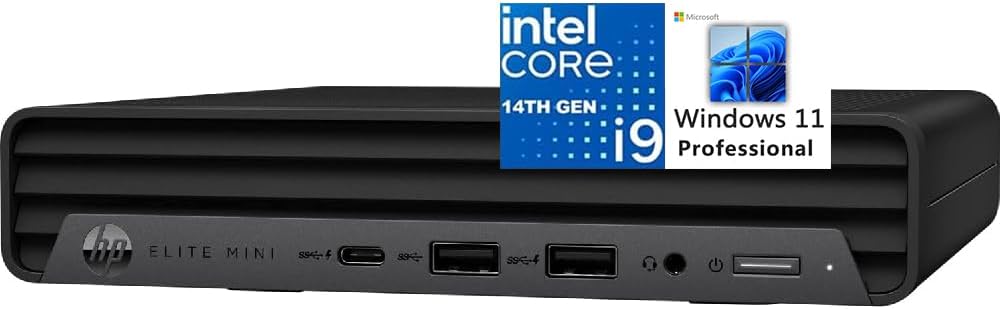
The HP Elite Mini 800 G9 delivers 14th Gen Intel Core i9 performance with a business focus. It includes Windows 11 Pro which offers enterprise-grade features for security and management. The design is ultra-quiet making it ideal for offices and quiet rooms.
We may earn a commission when you buy through this link, at no additional cost to you.
Connectivity features a USB Type-C port with 20Gbps signaling for fast data transfer and power delivery. Triple 4K display support allows for high-resolution workflows. The inclusion of keyboard and mouse adds value for immediate productivity.
Security is enhanced with built-in enterprise features and a slim chassis design. While RAM is at 16GB it is efficient for business applications. The build quality matches HP's reputation for reliability and support.
This model is excellent for corporate environments needing a compact secure solution. It provides essential performance for daily tasks with robust management tools. For business professionals it offers a turnkey setup with high-end hardware.
Windows 11 Pro includes management and security tools. This ensures data safety and easy IT management.
Keyboard and mouse included for immediate use. This saves time and cost during initial setup.
We may earn a commission when you buy through this link, at no additional cost to you.
Choosing the right mini PC involves balancing performance needs with physical constraints and budget. This guide outlines key factors to consider to ensure you select a device that fits your workflow.
Latest generations like 13th and 14th Gen offer hybrid architectures for better efficiency. Newer models include AI NPUs for local machine learning tasks which are becoming essential for modern workflows.
Prioritize the newest processor available within your budget for future-proofing.
DDR5 RAM is faster and more efficient than DDR4 for multi-tasking heavy loads. Ensure the minimum RAM is sufficient for your software requirements especially for video editing.
Look for systems supporting expansion to 64GB or 96GB if you anticipate growth.
PCIe 4.0 NVMe SSDs provide rapid boot and file access speeds. Dual M.2 slots allow you to separate OS and data drives for better organization.
Check for support for U.2 or SATA SSDs if you need massive storage capacities.
Multiple HDMI and DisplayPort outputs enable multi-monitor setups. USB-C with Thunderbolt support offers high-speed data transfer and docking capabilities.
Ensure the ports match your peripherals for a hassle-free setup.
2.5G LAN or 10G SFP+ ports are vital for fast file transfers in business environments. Wi-Fi 6E or 7 ensures low latency wireless connections.
Choose models with dual LAN ports for redundancy if uptime is critical.
Effective cooling systems keep performance stable under load. Models with heat pipes and larger fans are better for sustained workloads.
Check noise levels to ensure it fits your environment.
Windows 11 Pro offers better security and enterprise features than Home. Some models come with Linux support which is preferred by developers.
Verify the OS license type matches your organizational needs.
Extended warranties like 3-year plans offer better protection for expensive hardware. Local repair support minimizes downtime.
Select brands with a track record of reliable service.
Place the unit in a well-ventilated area to ensure optimal cooling. Avoid enclosed spaces where heat can accumulate and cause throttling during heavy workloads.
Use dust filters or blow out compressed air periodically to clean vents. This prevents dust buildup from degrading thermal performance over time.
Regularly update BIOS and drivers to maintain security and compatibility. Keep your OS and applications up to date for best performance.
Yes models with discrete graphics support like the MS-01 are capable of gaming. Integrated graphics can handle casual titles and esports games at decent settings. For AAA gaming always choose a model with an expandable GPU slot.
Most models support RAM expansion up to 96GB. Always check the manual for compatible DDR4 or DDR5 specifications before purchasing additional memory modules. Some units come with slots open for immediate upgrades.
These devices support 4K resolution on multiple monitors simultaneously. The latest models support 8K on one display via USB-C or Thunderbolt for high-end workstations.
Many modern Mini PCs support Linux out of the box. GEEKOM and MSISFORUM often provide drivers for Ubuntu and Debian. Check the manufacturer's compatibility list before installation.
Most 2026 models include Wi-Fi 6E or Wi-Fi 7 for faster wireless speeds. This ensures lower latency and better performance in crowded wireless environments.
Yes specific models like MS-01 have PCIe slots or Thunderbolt 4 for eGPU enclosures. This allows you to add discrete graphics cards for rendering or gaming.
The MINISFORUM M1-1390 stands out as the best overall choice for power and versatility. It balances raw performance with compact design and extensive connectivity options for most users.
For specialized needs consider the MS-01 for workstation expansion or GEEKOM for AI capabilities. Match the specific features to your primary tasks to ensure you get the most value.
Prices and availability fluctuate frequently so check current listings before purchasing. Always verify warranty terms and return policies to protect your investment in these powerful machines.