
ASUS Prime AP201 Micro-ATX PC Case
4.7Editor score
Mesh panels increase airflow significantly
Compact 33L footprint saves space
Tool-free side panels for easy access
This guide compares the best ASUS PC Case options available in October 2026 to help you choose the right chassis for your gaming or workstation build.
Selecting the right computer chassis is crucial for system performance and aesthetics. ASUS offers a diverse range of cases designed to support various hardware configurations and cooling solutions.
We evaluated ten top ASUS models based on airflow, build quality, and feature sets. Each entry was assessed for compatibility with modern components and ease of installation.
This list highlights key strengths and weaknesses for every pick. Prices fluctuate often, so verify current costs before making your final purchasing decision today.
4.7Editor score

4.8Editor score

4.6Editor score
This side-by-side comparison highlights key specifications for all ten ASUS cases to help you identify the best fit for your specific build requirements.


The ASUS TUF Gaming GT501 stands out as a robust choice for enthusiasts needing room for high-end components. It boasts a strong rating and supports E-ATX boards while maintaining excellent airflow through its mesh design.
We may earn a commission when you buy through this link, at no additional cost to you.
Its standout qualities include the custom TUF gaming spatter pattern and a full view side panel made of 4mm-thick smoked tempered glass. The included 120mm RGB fans and rear PWM fan ensure your system stays cool under heavy load.
While the chassis is sturdy, it adds weight to your setup. The carry handles help with transport but the unit itself is large. This is acceptable given the premium build quality and thermal performance it delivers daily.
This case is ideal for gamers and content creators building powerful rigs. It balances aesthetics with function perfectly. We recommend it for anyone prioritizing cooling and expandability in a durable package.
The GT501 supports up to seven optional fan-mounting points allowing you to tailor airflow exactly to your needs. Pre-installed fans provide immediate thermal relief without extra purchases.
Tool-free side panels make installing hardware a breeze. You can quickly access internal components for upgrades or cleaning without needing screwdrivers.
We may earn a commission when you buy through this link, at no additional cost to you.
The ASUS Prime AP201 delivers exceptional value for builders seeking efficiency. It earns a high rating for its unique quasi-filter mesh panels and ability to fit ATX PSUs despite its small footprint.
We may earn a commission when you buy through this link, at no additional cost to you.
Key strengths include over 57000 precision-machined holes that increase airflow significantly. The tool-free side panels simplify access while the extended motherboard tray aids in clean cable management.
Its micro-ATX support limits motherboard choices slightly. This trade-off is acceptable for users wanting a compact build. The spatial efficiency ensures you do not sacrifice much power in a small package.
This case suits budget-conscious users needing reliable cooling. It is perfect for home offices or dorm rooms. Choose this for a balance of size and performance without breaking the bank.
With support for 280 and 360mm radiators this case handles thermal loads well. The mesh design ensures components stay cool during intense gaming sessions.
Despite a 33L footprint it supports large storage devices and GPUs. This makes it a versatile option for those with limited desk space.
We may earn a commission when you buy through this link, at no additional cost to you.
The ASUS ROG Hyperion GR701 is a statement piece for high-end setups. It earns top marks for its semi-open structure that supports massive 420mm radiators and custom water cooling loops.
We may earn a commission when you buy through this link, at no additional cost to you.
Key strengths involve the sturdy diecast aluminum-alloy frame and hinged tool-free side panel. The integrated graphics card holder supports vertical and horizontal installations while the storage drawer adds convenience.
Its high price may deter budget builders. However, the convenience features justify the cost for enthusiasts. The unique design stands out among standard cases and offers superior cooling potential.
This case targets power users wanting premium features. It is ideal for custom loop builders. If you need maximum cooling and style this is the ultimate choice for your system.
The semi-open structure allows for immense airflow. It supports up to two 420mm radiators making it perfect for liquid cooling enthusiasts.
Features like a built-in drawer and card holder enhance the build experience. These details make installation and maintenance easier.
We may earn a commission when you buy through this link, at no additional cost to you.
The ASUS TUF Gaming GT502 Horizon offers a unique dual-chamber layout. It receives solid ratings for separating CPU and GPU cooling zones while providing a stunning panoramic view.
We may earn a commission when you buy through this link, at no additional cost to you.
Its main strength lies in the boundless panoramic design with tempered glass at front and side. The high-speed USB Type-C port ensures fast data transfer for peripherals.
Some users prefer clear glass over tinted options. This is acceptable given the aesthetic appeal and view of internal components. The modular design helps streamline hardware installation effectively.
This case is great for builders wanting airflow separation. It works well for high-end gaming rigs. We suggest it for those prioritizing cooling efficiency and modern connectivity.
The dual-chamber chassis divides the interior into two zones. This ensures CPU and GPU thermal zones stay independent for better performance.
Front panel high-speed USB Type-C allows fast data transfer. It meets modern standards for quick connection speeds easily.
We may earn a commission when you buy through this link, at no additional cost to you.
The ASUS A31 PLUS focuses on cable management with hidden connectors. It rates well for pre-installed ARGB fans and a clean setup potential for specific motherboard configurations.
We may earn a commission when you buy through this link, at no additional cost to you.
Its key strengths include dual tempered glass panels for unobstructed views. The 8-degree angled base enhances airflow efficiency and widens the viewing angle for immersion.
Support depends on motherboard type which limits general use. This trade-off is acceptable for those wanting a clutter-free look. The pre-installed fans save time during build.
This case fits users wanting aesthetic cable management. It is ideal for compatible hidden connector boards. Choose it for a clean look without excessive cable routing.
The 8-degree angled base improves thermal performance. It also widens the viewing angle for a better visual experience.
Designed for hidden connectors to reduce clutter. This leads to a streamlined build that looks professional and tidy.
We may earn a commission when you buy through this link, at no additional cost to you.
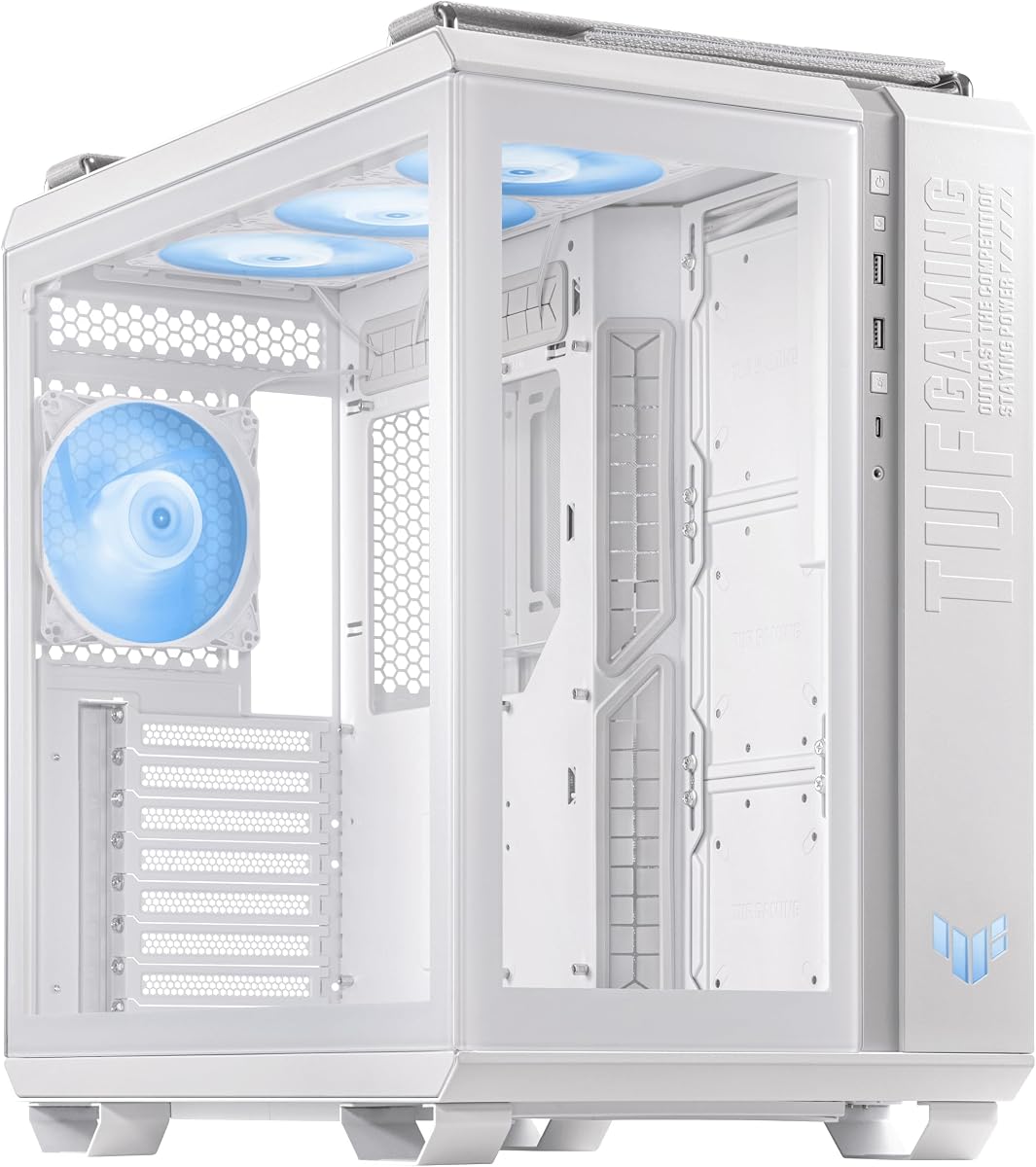
The ASUS TUF Gaming GT501 White Edition mirrors the original with a fresh look. It maintains high ratings for cooling performance and build quality while offering a distinct color scheme.
We may earn a commission when you buy through this link, at no additional cost to you.
Key strengths are the metal front panel with custom TUF gaming spatter pattern. Ergonomic woven-cotton carry handles make transport safe for up to 30Kg of hardware.
The smoked glass may hide white components. This is acceptable as it maintains the sleek look. The included RGB fans ensure your build lights up effectively.
This case suits users wanting a white theme. It is perfect for gaming setups. Choose it for performance without sacrificing style or build quality.
Equipped with Aura Sync RGB-illuminated fans and PWM rear fan. It supports 360mm water-cooling radiators effectively.
Ergonomic handles enable safe transport up to 30Kg. This makes moving the chassis easier than standard models.
We may earn a commission when you buy through this link, at no additional cost to you.
The ASUS TUF Gaming GT301 offers a compact yet effective solution. It earns solid ratings for its honeycomb front panel and integrated RGB controller hub.
We may earn a commission when you buy through this link, at no additional cost to you.
Key strengths include the perforated honeycomb front panel aiding airflow while the glass side showcases internals. The integrated 6 ports Aura Sync addressable-RGB controller hub simplifies lighting control.
Limited fan mounting spots restrict expansion slightly. This is acceptable for a mid-tower build. The included headphone hanger adds a convenient feature for users.
This case is good for gamers with limited space. It supports ATX boards well. Choose it for style and airflow in a smaller form factor.
Pre-installed fans and honeycomb front ensure airflow. Space reserved for 280/360mm radiators enhances thermal performance.
Integrated RGB controller and headphone hanger add utility. These details simplify the user experience for daily use.
We may earn a commission when you buy through this link, at no additional cost to you.
The ASUS TUF Gaming GT502 Horizon TG ARGB White combines cooling with modern aesthetics. It rates highly for its dual chamber housing and unobstructed panoramic view.
We may earn a commission when you buy through this link, at no additional cost to you.
Key strengths involve the two-chamber housing forming independent cooling zones for CPU and GPU. The 20Gbps USB Type-C port provides high-speed storage connection.
The tinted glass may limit view of RGB. This is acceptable given the overall design appeal. The fully modular design simplifies hardware installation significantly.
This case is great for white builds. It suits gamers wanting cooling efficiency. Choose it for a balance of performance and modern connectivity.
Two-chamber housing forms independent cooling zones. This helps maintain lower temperatures for key components.
Front panel features 20Gbps USB Type-C. It allows fast data transfer for modern peripherals.
We may earn a commission when you buy through this link, at no additional cost to you.
The ASUS A31 Plus TG ARGB Black stands out for high user satisfaction. It earns a top rating for concealed port readiness and panoramic design.
We may earn a commission when you buy through this link, at no additional cost to you.
Key strengths include support for 360mm radiators and GPUs up to 380mm. The 8-degree angled base combines functionality and aesthetics for better thermal performance.
Concealed port readiness depends on motherboard type. This is acceptable for those seeking a clean look. The tempered glass panels offer unobstructed views of your build.
This case suits users prioritizing thermal efficiency. It fits large GPUs well. Choose it for a balance of view and performance.
The 8-degree angled base improves airflow efficiency. It combines functionality and aesthetics for an intense experience.
Supports 360mm radiators and 380mm graphics cards. This wide compatibility ensures room for powerful hardware.
We may earn a commission when you buy through this link, at no additional cost to you.
The ASUS TUF Gaming GT502 Plus offers a fully modular design for enthusiasts. It receives high ratings for dual chamber internal cooling and tool-free side panels.
We may earn a commission when you buy through this link, at no additional cost to you.
Key strengths include independent cooling zones for CPU and GPU. The front panel features a USB 3.2 Gen 2 Type-C port for high-speed transfer up to 10 Gbps.
Panels are removable for installation ease. This is acceptable as it simplifies hardware setup. The four ARGB fans ensure balanced cooling performance out of the box.
This case is ideal for users wanting flexibility. It works for ATX builds well. Choose it for modular convenience and cooling performance.
GT502 internals are divided into two chambers. This configures independent cooling zones for CPU and GPU.
Front panel features USB 3.2 Gen 2 Type-C. It supports transfer speeds up to 10 Gbps easily.
We may earn a commission when you buy through this link, at no additional cost to you.
Choosing the right case involves balancing aesthetics, cooling, and size. This section outlines key factors to consider for your build.
Form factor determines the motherboard size your case supports. Micro-ATX cases are compact while E-ATX towers accommodate large boards. Measure your desk space before buying to avoid fit issues.
Ensure your chosen case supports the motherboard size you plan to use.
Airflow is critical for component longevity and performance. Look for cases with mesh panels or multiple fan mounts. High-performance hardware requires efficient thermal management to prevent throttling.
Prioritize models with ample fan-mounting points for optimal cooling.
Proper cable management improves airflow and aesthetics. Look for extended trays or hidden connector support. Clean cable routing makes upgrades easier and reduces clutter inside the chassis.
Select a case with ample space for routing cables neatly.
Build quality often correlates with durability and protection. Metal chassis protect against damage better than plastic. Consider your preferred style such as glass panels or RGB lighting effects.
Choose materials that match your build style and durability needs.
Expansion slots allow for multiple GPUs or capture cards. Check the total slot count before purchasing. Ensure it supports your graphics card length and radiator dimensions for liquid cooling.
Verify your GPU length and radiator compatibility before buying.
Modern cases include USB Type-C ports for fast data transfer. Ensure your peripherals utilize these ports effectively. Check the USB version speed to meet your storage or peripheral needs.
Look for USB 3.2 Gen 2 Type-C ports for speed.
Tool-free panels simplify building and maintenance. Check if the case allows easy access without screwdrivers. Modular designs let you remove panels to fit larger components comfortably.
Prefer tool-free mechanisms to streamline your build process.
Your budget determines the feature set you can afford. Higher priced models often include fans and better airflow. Weigh the cost against included features to find the best value.
Compare included features like fans and ports for value.
To maintain optimal airflow, regularly clean dust filters using compressed air. This prevents heat buildup and ensures consistent performance over time.
When moving your system, use provided handles and secure the casing. Avoid tilting the case excessively to protect internal components from shifting.
Ensure tool-free panels are fully engaged before operating. This prevents accidental dislodging and protects the internal hardware during daily use.
Yes, most ASUS cases support water cooling including AIO radiators. Models like the GT501 support 360mm radiators. Verify specific dimensions before purchasing custom loops.
ASUS cases cover Micro-ATX to E-ATX. The AP201 is Micro-ATX while the GT501 supports E-ATX. Check compatibility guides for your specific motherboard model.
Many models include pre-installed RGB fans. The GT301 comes with four fans while others have three. Check product details to confirm included lighting.
Newer models like the GT502 Horizon feature USB Type-C. Older models may rely on standard USB ports. Verify front panel specifications before buying.
Yes, several models like the GT501 White Edition support white themes. Match components to the case color for a cohesive aesthetic build.
Use compressed air to blow out dust from mesh filters. Remove panels carefully and repeat this every few months to maintain airflow.
ASUS cases often feature extended trays for cable management. Use cable ties and routed paths for a clean look. Hidden connectors simplify this further.
This guide highlights the top ASUS PC Case options available in November 2026. Each model balances cooling and aesthetics for different build needs.
Prioritize cooling and form factor when selecting a chassis. Features like USB-C ports add modern value to your setup effectively.
Prices change frequently so verify current costs before purchasing. Check our links for the best deals available today.