
GETPALS Wireless Charger iPhone Charging Station
4.2Editor score
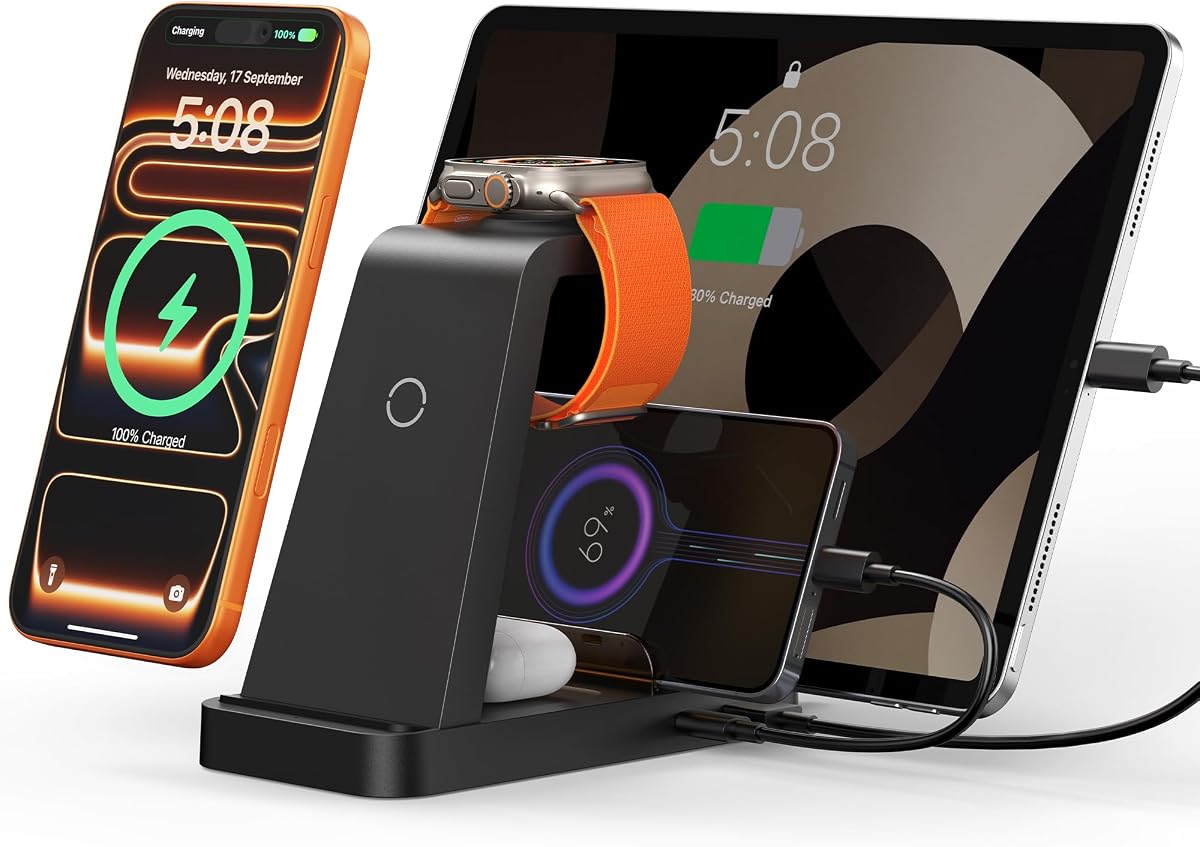
3-in-1 wireless charging support
Foldable lightweight portable design
Overcurrent and overheating protection
Discover the top charging dock for multiple Apple devices to organize your iPhone, Apple Watch, and AirPods efficiently without cluttering your desk or
Managing multiple Apple devices often leads to cable clutter and messy desks. A dedicated charging dock for multiple Apple devices helps streamline your setup while keeping power sources organized and accessible.
We compared ten top-rated charging stations based on port count, charging speed, safety features, and design. Each option offers unique benefits for different needs, from travel-friendly docks to high-power multi-device hubs.
Each product review highlights key specs, pros, and cons to help you choose wisely. Prices and availability may change, so check current listings before purchasing your ideal charging solution today.
4.2Editor score
4.3Editor score

4.6Editor score
This table compares all ten charging docks side-by-side across key features like charging ports, wireless support, safety certifications, and included accessories.


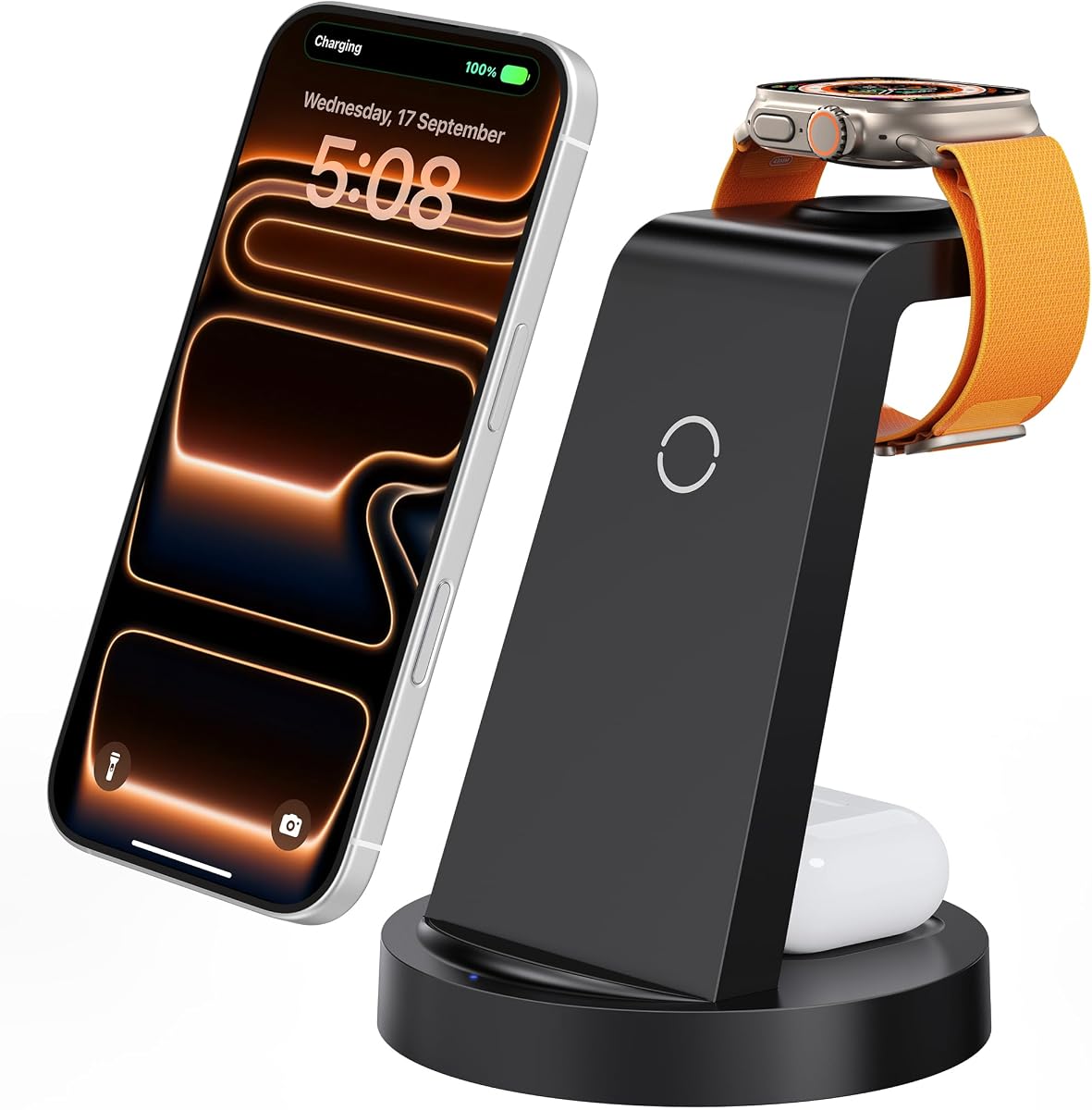


This 3-in-1 charging station delivers solid value for users needing basic wireless charging across iPhone, Apple Watch, and AirPods. With a 4.2 rating and foldable design, it suits travel or tight spaces.
We may earn a commission when you buy through this link, at no additional cost to you.
Its standout feature is portability combined with safety protections including overcurrent and overheating safeguards. The non-slip surface keeps devices secure, while clear LED indicators show charging status at a glance.
Trade-offs include a limitation on AirPods needing a MagSafe case and lower wattage compared to premium options. These are acceptable for casual home users prioritizing cost savings over max charging speed.
Ideal for travelers or budget-conscious buyers seeking a reliable nightstand charger without clutter. It balances functionality and affordability well for families wanting organized Apple device power management.
The lightweight foldable build fits easily into bags for travel, ensuring your devices stay powered on the go without bulky cables.
Built-in overcurrent and overheating protection safeguards your devices from power surges or excessive heat during extended charging sessions.
We may earn a commission when you buy through this link, at no additional cost to you.
This 5-in-1 wireless charging station stands out for its powerful 36W adapter and ability to charge five devices at once. Its FCC certification and robust safety features make it a reliable choice for busy households.
We may earn a commission when you buy through this link, at no additional cost to you.
The included USB to Lightning and Type-C to Type-C cables add convenience for iPad and Android devices. Its air vents efficiently dissipate heat, ensuring stable performance during long charging periods without overheating risks.
Removal of phone cases during iPhone charging may inconvenience users. This limitation is acceptable given the speed and versatility, especially for families managing multiple tech devices daily.
Best for power users needing a centralized hub for laptops, phones, and accessories. It simplifies cable clutter while delivering fast charging and comprehensive safety features in one compact unit.
The 36W adapter efficiently powers up to five devices simultaneously, reducing wait times and keeping all your gadgets ready to use.
Comes with USB and Type-C cables for flexible connectivity across iPhone, iPad, and compatible Android devices straight out of the box.
We may earn a commission when you buy through this link, at no additional cost to you.
This MagGo Qi2 charging station delivers premium wireless charging with official Apple Watch certification and true 15W power. It stands out as the top choice for users prioritizing speed and compatibility.
We may earn a commission when you buy through this link, at no additional cost to you.
The adjustable angle up to 45 degrees enables comfortable StandBy mode viewing. Its compact footprint keeps desks tidy, while Anker's reliability ensures consistent performance across iPhone, Watch, and AirPods.
Higher cost and three-device limits may deter those needing more ports. For pure Apple users seeking quality and speed, the investment is well justified by certified performance and build.
Ideal for Apple ecosystem users wanting fast, certified wireless charging in a sleek design. It balances premium features with practicality for daily desktop or nightstand use.
Official certification guarantees your Apple Watch charges safely and efficiently, reaching full battery faster than non-certified alternatives.
Adjust the charging angle to suit landscape or portrait viewing, perfect for using StandBy mode while your devices charge.
We may earn a commission when you buy through this link, at no additional cost to you.
This 320W charging station offers impressive power with ten ports and high-speed 65W USB-C capability for laptops. It is designed for families or offices needing one solution to charge everything at once.
We may earn a commission when you buy through this link, at no additional cost to you.
The eight complimentary cables eliminate immediate cable needs, and smart chips prevent overcharging. Its flame-retardant materials and anti-slip pads add safety and stability on any desktop surface.
Its size may not suit tight spaces or travel, and using original cables is recommended for optimal results. These are minor trade-offs for such extensive connectivity and high power output.
Best for power users and families with many gadgets needing simultaneous charging. It consolidates multiple wall adapters into one sturdy, safe, and efficient charging center.
Dual 65W USB-C ports provide enough power to charge MacBook Pro laptops efficiently without needing separate chargers.
Eight short cables included save you buying extras immediately, covering most common device types right out of the box.
We may earn a commission when you buy through this link, at no additional cost to you.
This 7-in-1 charging station adds smart clock functionality with Bluetooth time sync and customizable ambient lighting. It is a great all-in-one solution for nightstands needing both power and utility.
We may earn a commission when you buy through this link, at no additional cost to you.
The clock displays time and temperature, while the lighting sets the mood. It supports iPhones, Apple Watches, and Android phones, offering versatility across ecosystems with robust safety features.
Samsung Watch compatibility is absent and strict case limits may inconvenience users. Still, for Apple-centric users wanting a stylish functional charger, these drawbacks are acceptable.
Best for users wanting a nightstand hub combining charging with clock and lighting features. It blends practical power delivery with aesthetic ambiance for modern living spaces.
Automatic time sync via Bluetooth keeps the clock accurate, while indoor temperature display adds extra convenience to your space.
Adjustable warm and cool lights let you customize your room ambiance, creating the perfect setting for relaxing or working.
We may earn a commission when you buy through this link, at no additional cost to you.
This 3-in-1 charging station provides straightforward wireless charging for iPhone, Watch, and AirPods using a single USB-C cable. It is designed for simplicity and ease of use.
We may earn a commission when you buy through this link, at no additional cost to you.
An 18W adapter ensures stable power delivery, and the soft blue LED indicator is gentle for bedside use. It supports cases up to 5mm, adding flexibility without removing protection.
Lack of magnetic alignment means manual centering is needed. For those valuing simplicity over MagSafe features, this trade-off is minor and acceptable for nightly charging routines.
Ideal for users seeking a no-fuss wireless charging solution at a budget-friendly price. It keeps your nightstand clean while providing reliable charging for essential Apple devices.
A single USB-C cable setup reduces cable clutter and makes the charger easy to use and move around as needed.
The soft blue LED indicator displays charging status without harsh brightness, making it comfortable for bedside nightstand use.
We may earn a commission when you buy through this link, at no additional cost to you.
This foldable 3-in-1 charging station offers MagSafe magnetic alignment for iPhones 12 and above. Its compact design makes it perfect for travelers wanting wireless charging without cables.
We may earn a commission when you buy through this link, at no additional cost to you.
The 180-degree mat transforms into a stand for media viewing while charging. FCC certification ensures safety, and magnetic alignment ensures precise device placement without fiddling around.
Compatibility limited to iPhone 12+ and MagSafe AirPods cases may restrict some users. For compatible device owners, the travel convenience and design are unmatched in this category.
Best for frequent travelers owning newer iPhones needing reliable and portable wireless charging. It combines magnetic precision with foldable convenience to minimize packing bulk.
Built-in magnets ensure your iPhone aligns perfectly for efficient wireless charging without manual adjustments or sliding around.
The mat folds flat for travel and unfolds into a stand, giving flexibility for viewing content while your devices power up.
We may earn a commission when you buy through this link, at no additional cost to you.
This 300W charging station delivers substantial power with dual 65W USB-C ports for laptops plus extra ports for tablets and phones. Its solid construction and safety features make it a robust choice.
We may earn a commission when you buy through this link, at no additional cost to you.
The six included short cables cover common needs immediately. Its flame-retardant housing and safety protections ensure device safety, while sturdy slots accommodate thicker devices and cases.
Limited USB-A ports and large size may not fit all setups. For users needing high power for laptops and phones simultaneously, these limitations are reasonable given the performance.
Best for families or professionals needing to charge laptops and mobile devices together. It offers high power output and safety in one consolidated charger hub.
Dual 65W USB-C ports provide sufficient power to charge MacBook laptops without needing separate dedicated chargers for them.
Six short charging cables cover most device types and save the expense and hassle of buying separate cables immediately.
We may earn a commission when you buy through this link, at no additional cost to you.
This 600W charging station delivers maximum power with thirteen simultaneous charging ports including dual 100W USB-C for laptops. Its 5-star rating reflects top performance and safety.
We may earn a commission when you buy through this link, at no additional cost to you.
GaN 5 technology ensures efficient fast charging with lower heat. The wireless section keeps devices tidy, and the LED indicator turns off after five seconds to avoid nighttime light pollution.
Its large size and premium cost limit portability and budget users. For offices needing many devices charged reliably, the performance justifies the footprint and expense easily.
Best for large households or offices needing to charge many devices simultaneously. It combines high wattage, safety, and efficient cooling in a comprehensive power solution.
Dual 100W USB-C ports deliver enough power for fast charging high-demand laptops and other devices simultaneously without lag.
The LED indicator turns off after five seconds, ensuring a peaceful dark environment for sleeping without light disturbance.
We may earn a commission when you buy through this link, at no additional cost to you.
This 600W charger organizes up to fifteen devices with an integrated wireless station and wide laptop slot. Its GaN III tech ensures fast cool charging for high-demand electronics.
We may earn a commission when you buy through this link, at no additional cost to you.
The extra-wide slot accommodates laptops in protective cases easily. The wireless section handles iPhones and watches neatly, while 8-layer protection ensures safe reliable overnight charging without worries.
Its large size limits portability and suits fixed desks more. For power users needing many device charging and safety, this trade-off is acceptable for functionality and capacity.
Best for power users and families with many gadgets needing comprehensive organization. It merges wireless and wired power in one robust unit for maximum convenience.
The 1.57-inch wide slot fits laptops and tablets even with thick cases, securing them safely while they charge.
GaN III technology delivers fast charging while maintaining low temperatures to protect your expensive electronics during long sessions.
We may earn a commission when you buy through this link, at no additional cost to you.
Choosing a charging dock for multiple Apple devices requires understanding your device mix, charging needs, and workspace constraints to find the perfect match.
Consider how many devices you need to charge simultaneously. Some docks support three devices for basic users, while others handle up to fifteen including laptops and tablets.
Choose a dock with enough ports to cover all your gadgets without extra plugs, ensuring convenience and reducing outlet congestion at home or office.
Wireless charging docks eliminate cables for phones and watches but require compatible devices and cases. Wired docks offer flexibility for various electronics via USB-C or USB-A ports.
Select wireless for clean aesthetics and convenience if you only charge Apple devices, or combine both for versatile charging across all gadget types.
Charging speed varies by wattage and technology. Look for docks with 65W or higher for laptops, and 15W wireless for fast iPhone charging without heat buildup.
Prioritize docks offering fast charging capabilities to reduce wait times and keep your devices powered up efficiently throughout your busy day.
Design affects both aesthetics and portability. Foldable compact docks suit travelers, while larger multi-port stations fit fixed desks for home office use.
Match the dock's size and form factor to your space needs, ensuring it fits neatly without cluttering your surface or packing bag.
Safety is critical when charging multiple devices. Look for FCC certification and protections against overcharging, overheating, and short circuits to protect your expensive electronics.
Choose docks with advanced chipsets that detect devices and regulate power automatically, ensuring safe charging cycles without risking battery health.
Some docks require cases thinner than certain millimeters for effective wireless charging, while others support thicker cases with adjustable slots for wired power.
Check case compatibility requirements before buying to avoid inconvenience, ensuring you can charge devices without removing protective covers daily.
Many docks come with adapters and short cables, saving extra purchases. Others only include the station, requiring separate power sources and connection cables.
Review what's included to avoid hidden costs, preferring bundles with necessary cables and adapters for immediate hassle-free setup right out of the box.
Trusted brands often provide better quality control and customer support. Check warranty periods and service availability before purchasing to protect your investment.
Opt for reputable manufacturers offering clear warranty terms, ensuring you receive reliable support if any issues arise after purchase.
Connect the charging dock to a power source using the included adapter and ensure all ports are securely in place before plugging in your devices. Start with one device to confirm proper operation.
Place devices properly aligned on wireless pads or insert cables firmly into ports. Avoid overloading cables or ports to prevent wear, and use only certified cables for optimal charging speed.
Keep the dock in a cool dry area away from direct sunlight or heat sources. Regularly clean dust from vents and surfaces to maintain airflow and ensure safe efficient charging performance over time.
Many docks support universal devices via USB-C and USB-A ports, but wireless charging is usually limited to Apple devices. Check product specs to confirm compatibility with Android phones or other brands.
Most wireless docks work with cases under 2 to 5 millimeters thick. Thicker or metal cases may block charging, so remove them if charging fails or slows down significantly.
Yes, most docks include protection circuits to stop charging once devices are full. Always use certified adapters and avoid placing the dock near flammable materials to ensure safety.
MagSafe uses magnets for precise alignment and faster charging up to 15W for iPhones. Qi is a standard wireless charging technology that works without magnets but may be slower or less accurate.
Docks with 65W or higher USB-C ports can charge MacBook Pros. Lower wattage docks may charge slowly or not support laptops at all, so verify power specs before buying.
Common causes include thick cases, misalignment, or incompatible cables. Try removing the case, repositioning the device, or using the included adapters to resolve charging issues quickly.
We reviewed ten charging docks ranging from portable foldable options to powerful multi-port hubs. Each offers unique strengths depending on your device count and workspace needs.
Prioritize safety certifications, charging speed, and compatibility with your specific gadgets before making your choice. A good dock simplifies your tech routine while keeping everything powered efficiently.
Prices and availability may change over time so check current listings to confirm details before purchase. Find the dock that fits your lifestyle to enjoy clutter-free organized charging every day.