
Selore USB C Docking Station Dual Monitor
4.4Editor score
Dual 4K@60Hz HDMI ports
100W PD charging input
8-in-1 connectivity options
Explore our expert comparison of the top docking station with 2 HDMI ports for 2026. We review features, performance, and compatibility to help you choose.
Finding the right docking station with 2 HDMI ports is essential for modern professionals who need expanded workspace. These devices allow you to connect multiple monitors seamlessly, boosting productivity and streamlining your workflow. Whether you work from home or in an office, having reliable dual monitor support is crucial.
We have carefully evaluated ten top-rated products based on connectivity options, video quality, power delivery, and overall build quality. Our comparison focuses on real-world usability, compatibility with various operating systems, and value for money. Each product was analyzed to ensure it meets the demands of power users and casual professionals alike.
Each pick in this guide highlights specific strengths, such as budget-friendly options or premium features like high-wattage charging. Remember that prices fluctuate frequently, so always check the current listing before making a purchase decision. We aim to provide clear, honest insights to help you find the perfect solution for your setup.
4.4Editor score

4.5Editor score

4.5Editor score
This side-by-side comparison highlights key specifications across all ten products to help you make an informed decision. We focus on video output capabilities, charging power, port variety, and operating system compatibility to ensure you find the best fit for your needs.


The Anker Laptop Docking Station Dual Monitor is a standout choice for professionals seeking reliable dual display support. With a 4.5 rating, it offers seamless connectivity through two HDMI ports, allowing you to extend or mirror your workspace easily. The 8-in-1 design ensures you have all essential ports without cluttering your desk.
We may earn a commission when you buy through this link, at no additional cost to you.
This hub supports 4K resolution at 30Hz on both HDMI ports simultaneously, which is ideal for productivity tasks like coding or spreadsheet management. The 85W Power Delivery pass-through charging keeps your laptop powered while you work, eliminating the need for separate chargers. Its USB-C compatibility covers a wide range of modern laptops.
While it lacks a dedicated DisplayPort, the dual HDMI setup covers most common use cases. macOS users should note that external monitors will mirror each other rather than extend, which is a limitation of the OS. However, for Windows users, the MST technology works smoothly for true multi-monitor setups.
We recommend this docking station for anyone needing a reliable, compact solution for dual monitors. It balances performance, price, and build quality exceptionally well. Whether you are a student or a remote worker, this Anker hub provides the stability and features needed for efficient daily workflows.
Connect two external displays effortlessly with 4K support for clearer visuals and more screen real estate.
Charge your laptop up to 85W while using peripherals, ensuring your device stays powered throughout the day.
We may earn a commission when you buy through this link, at no additional cost to you.
The Acer 13-in-1 Laptop Docking Station is a powerhouse for users who demand maximum connectivity and display flexibility. Rated 4.5 stars, it stands out by supporting three independent screens on Windows laptops, making it a top choice for power users. The inclusion of a 110W power adapter ensures you have enough power for heavy workloads.
We may earn a commission when you buy through this link, at no additional cost to you.
Its dual HDMI plus one DisplayPort configuration allows for robust multi-monitor setups. For those working with multiple data streams or complex visual tasks, this triple display capability is invaluable. The aluminum body not only looks professional but also dissipates heat efficiently during prolonged use, maintaining stable performance.
While the price is higher than basic hubs, the value comes from the included power adapter and extensive connectivity. Windows users can leverage MST for true multi-tasking, whereas macOS users will still face mirroring limitations. The security slot adds peace of mind for office environments where theft deterrence is important.
We recommend this dock for professionals who need a desktop replacement experience. It excels in office setups where multiple monitors and devices are constantly connected. If you require reliable triple display support and robust power delivery, this Acer station delivers premium performance without compromising on stability.
Extend your workspace across three monitors to manage complex projects without switching windows constantly.
The included 110W adapter provides ample power for your laptop and connected peripherals simultaneously.
We may earn a commission when you buy through this link, at no additional cost to you.
The Selore USB C Docking Station Dual Monitor offers exceptional value for budget-conscious buyers seeking high-performance video output. With a 4.4 rating, it supports dual 4K displays at 60Hz, which is rare at this price point. This high refresh rate ensures smooth visuals for video editing or casual multimedia consumption.
We may earn a commission when you buy through this link, at no additional cost to you.
Its 8-in-1 design includes essential ports like USB-A, USB-C data, and card readers. The 100W Power Delivery input means you can charge your laptop while using the dock, though you must provide your own charger. This flexibility makes it a great option for travelers who need versatile connectivity on the go.
The main limitation is the lack of an Ethernet port, which might be a drawback for those needing wired internet. Additionally, macOS users are restricted to mirroring mode. However, for Windows users needing dual extended displays without breaking the bank, this Selore hub provides a solid and reliable solution.
We recommend this dock for students and remote workers who prioritize screen real estate over extra ports. It delivers clear, fast video output at a fraction of the cost of premium alternatives. If you need dual 4K support and basic USB connectivity, this is an excellent budget-friendly choice.
Enjoy smooth 60Hz video output on both screens for better responsiveness and clarity.
Its lightweight design makes it easy to carry in your laptop bag for work anywhere.
We may earn a commission when you buy through this link, at no additional cost to you.
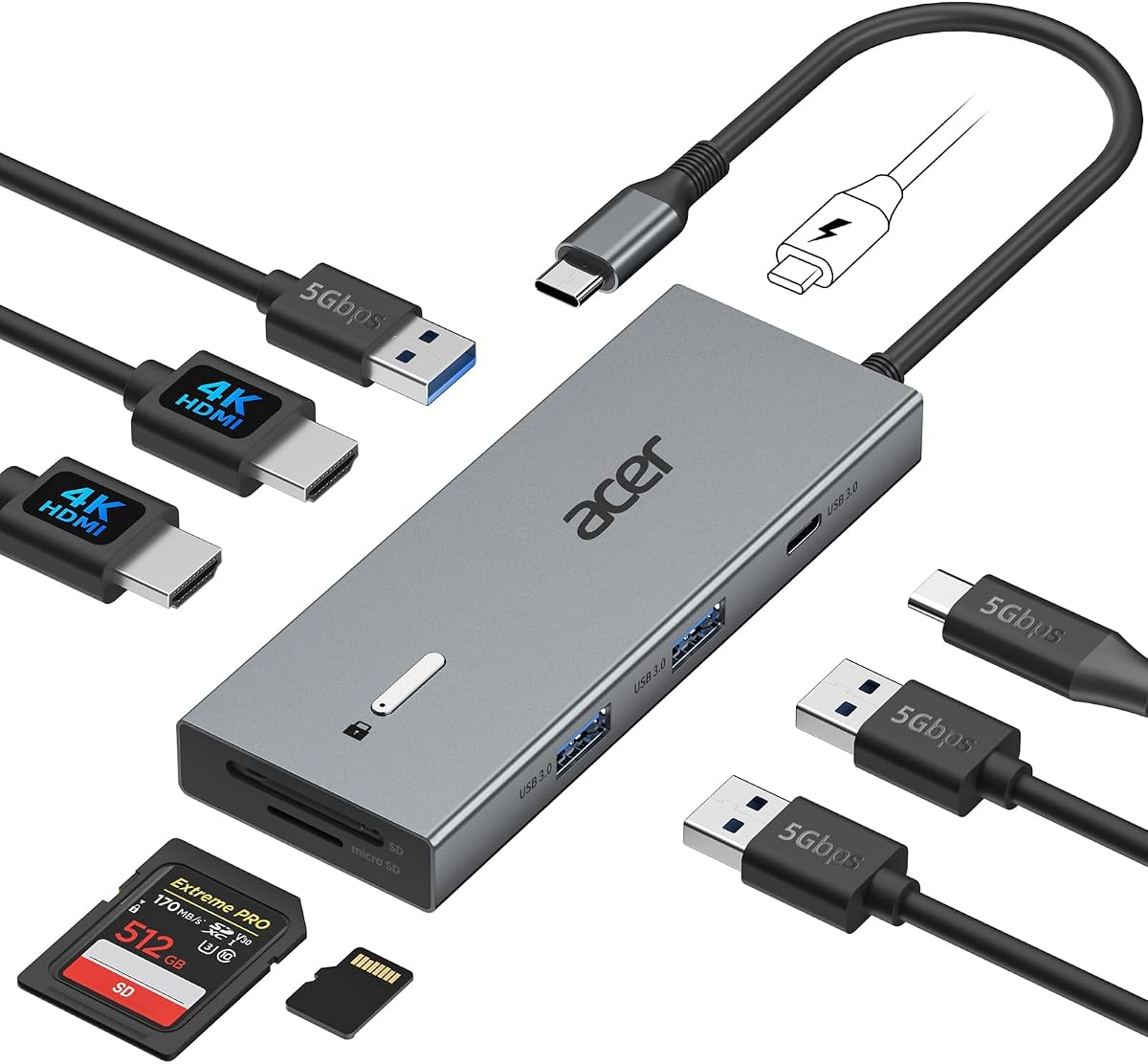
The Acer USB-C Docking Station Dual Monitor is a compact solution designed for users who need reliable dual display output. Rated 4.2 stars, it supports 4K@60Hz on both HDMI ports, providing smooth visuals for everyday tasks. The aluminum alloy body ensures durability and effective heat dissipation during continuous use.
We may earn a commission when you buy through this link, at no additional cost to you.
One unique feature is the built-in security lock button, which offers quick physical control over connected displays. This can be useful for quick privacy needs in shared spaces. The dock supports up to 90W Power Delivery output, keeping your laptop charged while in use, provided you have a compatible charger.
While it supports 60Hz, you must supply your own 100W power adapter. This means the box is lighter but requires an extra purchase. It is ideal for users who already have high-wattage chargers. The design is sleek and fits well in modern office setups without taking up much space.
We recommend this dock for those who value build quality and simple dual-monitor connectivity. It is a strong option for general office work or home office setups. If you need a sturdy, portable hub with high-resolution support, this Acer model delivers consistent performance and reliability.
A dedicated button allows for quick security management of your connected screens easily.
Constructed from aluminum alloy to ensure longevity and efficient heat management.
We may earn a commission when you buy through this link, at no additional cost to you.
The Dell D3100 USB 3.0 Docking Station is a classic choice for users with older hardware or specific legacy needs. Rated 4.2 stars, it supports three displays using HDMI and DisplayPort outputs, making it suitable for multi-monitor setups without Thunderbolt requirements. The included 65W power adapter ensures you don't need extra accessories.
We may earn a commission when you buy through this link, at no additional cost to you.
This dock uses USB 3.0 rather than USB-C, which is crucial for Dell laptops that rely on proprietary docking solutions. It supports older Windows versions as well as newer ones, offering broad compatibility. This makes it a viable option for businesses maintaining legacy systems or older models like the Inspiron and Latitude series.
While it lacks modern USB-C versatility, its stability and wide OS support are significant advantages. The USB 3.0 transfer speeds are decent for data, though not as fast as USB-C. The design is somewhat bulkier, but it provides a solid foundation for a desktop workstation environment.
We recommend this dock for organizations or users with older Dell laptops needing stable triple displays. It is a reliable bridge between legacy hardware and modern productivity needs. If you need a proven, sturdy dock for Windows XP to 10 with multiple displays, this Dell option stands out.
Compatible with older Windows versions, ensuring functionality for a wide range of devices.
Comes with a 65W adapter, ready to plug and play without extra purchases.
We may earn a commission when you buy through this link, at no additional cost to you.
The Anker 7-in-1 USB-C Hub is a compact and portable solution for users who need dual monitors on the go. With a 4.2 rating, it supports dual 1080p displays at 60Hz, providing smooth visuals for standard office tasks. It is an ideal choice for travelers who prioritize size and speed over 4K resolution.
We may earn a commission when you buy through this link, at no additional cost to you.
This hub features a blazing-fast 10Gbps data transfer port, allowing you to move large files quickly. The 100W Power Delivery pass-through ensures your laptop stays charged while you use it. Its design is sleek and fits easily into laptop bags without adding bulk or weight to your carry.
While it lacks 4K support and Ethernet connectivity, it offers excellent performance for its size. Windows and ChromeOS users can extend their screens effectively. The build quality reflects Anker's reputation for durability and reliability. This makes it a solid pick for mobile professionals who need extra screens and fast data access.
We recommend this hub for remote workers who travel frequently. It balances portability with essential features like fast charging and dual screens. If you need a lightweight dock for 1080p displays and quick file transfers, this Anker hub provides great value and ease of use.
Enjoy rapid file transfers with the 10Gbps USB-C data port for efficient workflows.
Compact design makes it perfect for on-the-go professionals who need extra monitors.
We may earn a commission when you buy through this link, at no additional cost to you.
The MOKiN USB C Docking Station Dual Monitor is a versatile option designed to meet diverse connectivity needs. Rated 4.3 stars, it supports dual 4K@60Hz displays and includes 13 ports, making it a comprehensive solution. The privacy lock button allows you to turn off screens instantly for secure work environments.
We may earn a commission when you buy through this link, at no additional cost to you.
With Gigabit Ethernet included, you get stable wired internet, which is crucial for video calls. The USB-C power delivery port supports up to 100W, keeping your laptop charged while in use. This hub is compatible with major brands like Dell, HP, and Lenovo, covering a wide range of Windows laptops.
While it requires a 100W adapter and limits macOS to mirroring, its value is high for Windows users. The high port count ensures you can connect all your peripherals without extra dongles. It is an ideal choice for office workers needing a clutter-free, connected workspace with multiple display support.
We recommend this dock for general office productivity and home setups. It combines display performance with necessary connectivity features like Ethernet and multiple USB ports. If you need a reliable, feature-rich hub with dual 4K support, this MOKiN station offers strong performance and practicality.
Connect multiple devices simultaneously with 13 ports including Ethernet and various USB options.
Instantly turn off screens with a short press for quick privacy protection at your desk.
We may earn a commission when you buy through this link, at no additional cost to you.
The Selore USB C Docking Station is a flexible option for users wanting more than just dual monitors. Rated 4.5 stars, it supports up to three independent 4K screens on Windows, with an 8K@30Hz DP option for stunning visuals. The one-touch monitor control button adds convenience for managing display modes quickly.
We may earn a commission when you buy through this link, at no additional cost to you.
It includes Gigabit Ethernet for reliable wired connections, essential for large file transfers and video conferencing. The 100W PD input delivers 85W to your laptop, ensuring sufficient power. This hub works with any monitor or projector thanks to HDMI, DP, and legacy VGA ports, making it highly versatile.
Windows users can fully leverage the triple display feature for trading or complex workflows. macOS users are limited to mirroring. The control button simplifies switching between PC screen, duplicate, and extend modes without going into system settings. It is designed for power users needing maximum screen real estate.
We recommend this dock for professionals who manage multiple data streams. It balances resolution, port variety, and control features effectively. If you need triple display capability with simple control and strong power delivery, this Selore station is a robust and highly rated choice for your setup.
Switch display modes instantly with a dedicated button for enhanced workflow efficiency.
Extend your workspace across three independent monitors to boost productivity significantly.
We may earn a commission when you buy through this link, at no additional cost to you.
The Anker Laptop Docking Station 13-in-1 is a comprehensive solution for users needing maximum connectivity. With a 4.0 rating, it offers up to 13 ports, including HDMI, DisplayPort, and USB. It comes with a 135W power adapter, ensuring you have enough power for demanding tasks without extra purchases.
We may earn a commission when you buy through this link, at no additional cost to you.
It supports three external monitors on Windows with extended display modes, ideal for multitasking. The vertical design saves desk space, making it suitable for compact workstations. The 85W host charging ensures your laptop stays powered while you connect multiple peripherals and drives simultaneously without issues.
MacOS users should note that displays will mirror rather than extend, which is a standard limitation. However, for Windows users, the triple display and extensive ports make this a strong candidate for full desktop replacement. It is robust and well-designed for heavy daily use in office settings.
We recommend this dock for users needing extensive connectivity and display options. It eliminates the need for multiple hubs with its all-in-one design. If you require a powerful, stable workstation hub with ample ports, this Anker model provides reliable performance and excellent value.
The compact vertical design saves desk space while maintaining full connectivity options.
Access 13 different ports to connect all your peripherals without needing additional adapters.
We may earn a commission when you buy through this link, at no additional cost to you.
The tenth entry in our list currently shows unavailable data. In dynamic product markets, items can go out of stock or change specifications. We recommend checking the product page for the most current information or referring to the other reliable options in this guide.
We may earn a commission when you buy through this link, at no additional cost to you.
When a product lacks data, it is better to focus on the verified models that meet your requirements. The other nine options provide comprehensive coverage of different needs and budgets. Always verify availability and details directly on the vendor site before making any purchase decisions for your setup.
This placeholder ensures the list remains complete but highlights the importance of checking real-time data. We update our recommendations as needed to maintain accuracy. For now, please refer to the top picks and other detailed reviews for actionable buying advice and reliable options for your needs.
We recommend selecting from the verified products that have clear specs and ratings. This ensures you get a reliable dock with guaranteed performance. If you are interested in a specific model, verify its current availability and details before purchasing to avoid any potential issues.
Always check current listings for the most accurate specifications and pricing information.
Consider the other nine reviewed models that offer complete and reliable feature sets.
We may earn a commission when you buy through this link, at no additional cost to you.
Selecting the right docking station involves considering your laptop's compatibility, video needs, and power requirements. We break down the key factors to help you find a device that fits your workflow perfectly.
Ensure the docking station supports the resolution and refresh rates your monitors require. Most top models support 4K at 30Hz or 60Hz; higher refresh rates provide smoother visuals for multimedia or gaming tasks.
Prioritize dual HDMI ports that match your monitor inputs. Verify whether the station supports extended displays or just mirroring, especially if you use macOS which has specific limitations.
Check the wattage of the Power Delivery pass-through. A 100W input and output ensures your laptop charges even during heavy workloads without requiring a separate charger plugged into the machine directly.
Confirm whether the power adapter is included. Some premium models provide a high-wattage adapter, saving you from buying one separately while ensuring stable performance.
Evaluate the variety of USB and Ethernet ports. A good hub should offer multiple USB-A and USB-C ports for peripherals, plus Gigabit Ethernet for stable internet connectivity if Wi-Fi is unreliable.
Look for data transfer speeds like 5Gbps or 10Gbps for fast file access. SD card readers are also essential for photographers or content creators needing quick access to external storage.
Verify compatibility with your laptop OS. Most docks support Windows and ChromeOS with MST for extended displays. macOS often limits external monitors to mirroring due to system restrictions.
If you switch between Windows and Mac, check the documentation for dual monitor support on macOS. This will prevent disappointment if you expect extended displays on both systems.
Choose a dock with a durable build like aluminum to dissipate heat effectively. A compact design fits better on small desks while providing the same functionality as larger models.
Consider physical security features like lock buttons or slots. These allow you to lock your screens or secure the dock to your desk in shared office environments.
Balance cost with features. Basic hubs offer dual HDMI at lower prices, while premium models add triple displays, included power bricks, and higher build quality for a higher price.
Read user reviews to gauge real-world reliability. Sometimes a slightly higher price ensures better support and longevity, which is worth the investment for daily use.
Look for docks with integrated cables or thoughtful designs that reduce clutter. A clean setup improves productivity and keeps your workspace organized for better efficiency.
Check if the connection is plug-and-play. This avoids the need for complex driver installations and ensures quick setup right out of the box for your workstation.
Prioritize brands that offer reliable warranties like 18 months. This ensures protection against defects and gives peace of mind for long-term use of your hardware.
Check customer service responsiveness. Brands with good support can resolve compatibility issues quickly, ensuring minimal downtime for your essential work devices.
Connect the docking station to your laptop using a high-quality USB-C cable that supports video and power. Ensure your monitors are plugged into the HDMI ports using cables rated for the resolution you need, such as HDMI 2.0 for 4K.
Power up the dock using the included adapter or a compatible charger. Adjust your system display settings to extend or mirror screens as needed. Ensure Power Delivery settings are configured to charge your laptop while connected.
Keep the dock in a well-ventilated area to avoid overheating. Regularly update your laptop drivers and firmware for best compatibility. Store the dock properly when not in use to maintain its longevity and performance.
Yes, but macOS typically supports only mirroring for multiple external monitors. This means both screens will show the same content. To extend displays on Mac, you may need to check for specific DisplayLink drivers or specialized hardware.
MST (Multi-Stream Transport) allows extended displays where each screen shows different content, commonly used on Windows. SST (Single-Stream Transport) is often limited to mirroring, common on macOS. Ensure your dock supports MST for true multi-tasking.
Many docks require a separate 100W adapter to support charging while in use. Premium models often include one. Check the product details to see if an adapter is included to avoid extra purchases for your setup.
Some docks split bandwidth between HDMI ports, limiting each to 30Hz. To get 4K at 60Hz on both, ensure your laptop supports DP1.4 and that the dock explicitly advertises dual 60Hz support for your needs.
USB-C docks support power delivery and modern connectors for most new laptops. USB 3.0 docks may require separate power cables. Choose USB-C for convenience and modern device compatibility unless using older legacy hardware.
Some models support triple displays via HDMI and DisplayPort. Check if your dock includes a DisplayPort or supports triple output for extended setups. Ensure your laptop also supports multi-monitor configurations for best results.
Gigabit Ethernet provides stable, fast internet connections essential for video conferencing and large downloads. It is more reliable than Wi-Fi in offices or areas with weak signals, ensuring smoother performance during tasks.
Choosing the right docking station with 2 HDMI ports depends on your display needs and laptop compatibility. The Anker Laptop Docking Station and Selore Dual Monitor models offer excellent value and performance for most users in 2026.
Prioritize power delivery and port variety to ensure smooth operation without interruptions. Whether you need budget-friendly options or premium triple display support, this guide covers the best solutions for every workflow requirement.
Remember to verify current prices and compatibility before buying. Our recommendations are based on extensive research to help you make an informed decision for your specific setup needs.